Feature embeddings
A detector spends almost all of its compute building a visual representation and then throws it away, keeping four numbers and a class id per object. That representation is useful on its own: it is what image retrieval, near-duplicate detection, clustering, dataset curation and re-identification all need.
YoloNASEmbedder exposes it as a fixed-length vector. Nothing is trained or added —
these are the same weights the detector uses, read one stage earlier.
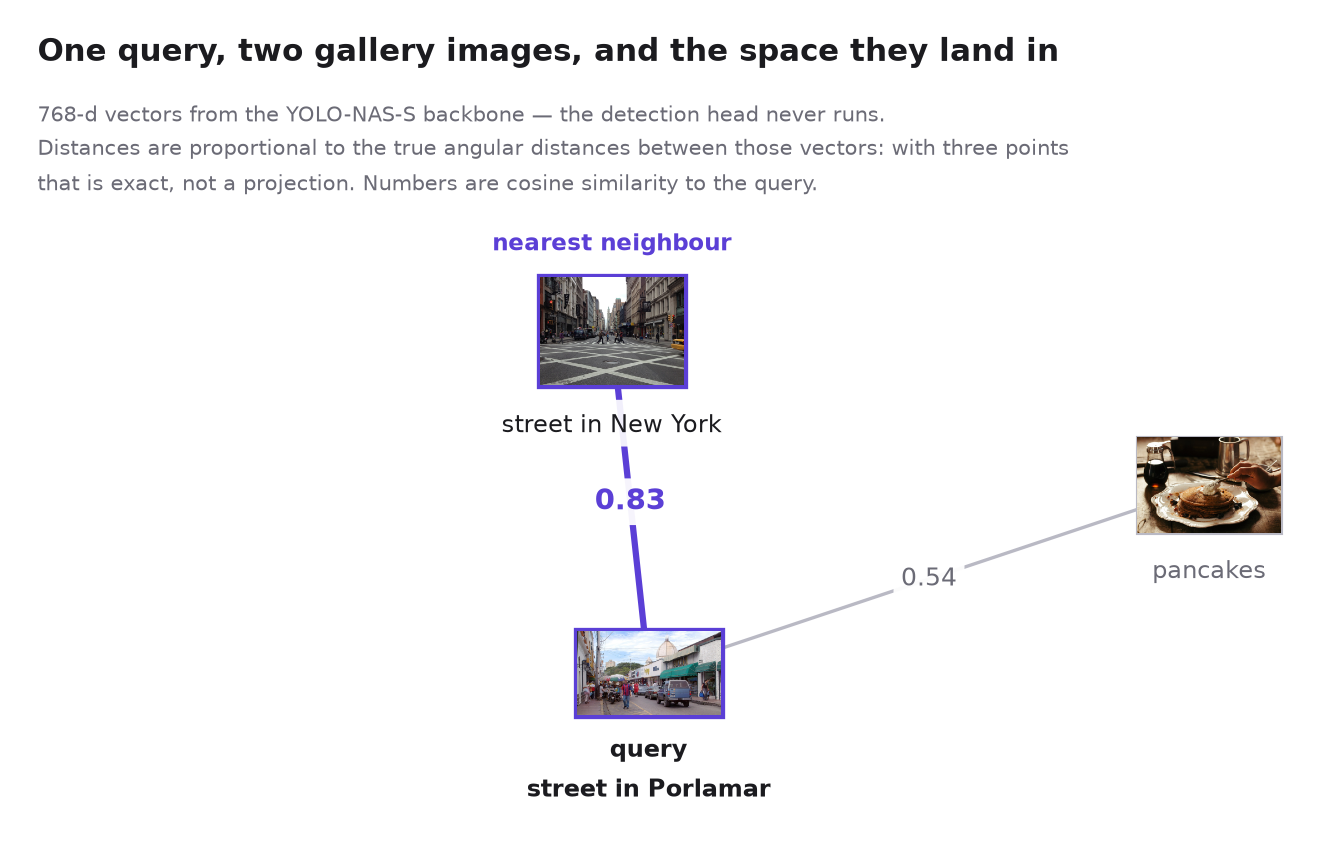
One query and two gallery images, embedded and plotted at their true angular distances —
with three points that is exact, not a projection. The street scene lands close to the
query and the pancakes land far away, without anything in the pipeline having been told
what either picture contains. Regenerate the figure with
uv run examples/embedding_space_figure.py.
Image embeddings
from modern_yolonas import YoloNASEmbedder

embedder = YoloNASEmbedder("yolo_nas_s", device="cuda")

vector = embedder("image.jpg")        # (768,) float32, L2-normalized
print(embedder.embedding_dim)         # 768
Vectors are L2-normalized by default, so a dot product is the cosine similarity and any nearest-neighbour index that takes inner product works unchanged:
import numpy as np

gallery = embedder.embed_batch(["a.jpg", "b.jpg", "c.jpg"])   # (3, 768)
similarity = gallery @ embedder("query.jpg")                  # (3,)
ranking = np.argsort(-similarity)
examples/embed_image.py is this loop over a folder, with batching.
Object embeddings
For recognition and re-identification you want a vector per object, not per frame.
embed_boxes takes boxes in the original image's pixel coordinates — which is exactly
what supervision.Detections.xyxy holds — and crops them out of the feature maps with
roi_align, so a whole frame's objects cost one forward pass:
from modern_yolonas import COCOClass, YoloNASDetector, YoloNASEmbedder

detector = YoloNASDetector("yolo_nas_s")
embedder = YoloNASEmbedder("yolo_nas_s")

detections = detector(image)
people = detections[detections.class_id == COCOClass.PERSON]

vectors = embedder.embed_boxes(image, people.xyxy)   # (len(people), 768)
Pair it with a tracker from supervision and those vectors become appearance features for re-identification across frames.
One pass, both outputs
Running the detector and then the embedder pays for the backbone twice, and the
backbone is essentially the whole cost. Detection and embedding share every layer up to
the head, so predict takes Task flags and reads both off a single forward pass:
from modern_yolonas import Task, YoloNASDetector

detector = YoloNASDetector("yolo_nas_s")
result = detector.predict(image, Task.DETECT | Task.EMBED | Task.EMBED_OBJECTS)

result.detections                       # sv.Detections
result.embedding                        # (768,) whole-image vector
result.detections.data["embedding"]     # (N, 768), one row per detection
| Flag | Gives you | In |
|---|---|---|
Task.DETECT |
Boxes, scores, class ids | result.detections |
Task.EMBED |
One vector for the image | result.embedding |
Task.EMBED_OBJECTS |
One vector per detection | result.detections.data["embedding"] |
Task.EMBED_OBJECTS implies Task.DETECT — the boxes are what gets embedded. Fields
you did not ask for come back None.
Per-object vectors live in detections.data, which is the field supervision provides
for exactly this, so they follow the boxes through slicing:
people = result.detections[result.detections.class_id == COCOClass.PERSON]
people.data["embedding"]        # rows still aligned with people.xyxy
detector(image) is unchanged — it is now shorthand for
predict(image, Task.DETECT).detections. predict_batch is the batched form.
To choose different layers or pooling for the detector's embeddings, hand it a
FeaturePooler:
from modern_yolonas import FeaturePooler

detector = YoloNASDetector("yolo_nas_s", embedding=FeaturePooler(layers=("c4", "c5")))
YoloNASEmbedder is still the right tool when you want embeddings only — it never runs
the head or NMS.
Which coordinates get embedded
embed_boxes and Task.EMBED_OBJECTS produce identical vectors for the same detections.
Both embed the box after it is clipped to the frame: a detection running off the edge
is described by the part of it that is actually visible, because the rest of its extent is
letterbox padding.
Choosing a layer
layers takes any of c2, c3, c4, c5 (backbone) and p3, p4, p5 (neck).
| Layer | Stride | Channels | What it holds |
|---|---|---|---|
c2 |
4 | 96 | Edges, texture, colour |
c3 |
8 | 192 | Parts and local patterns |
c4 |
16 | 384 | Object-level structure |
c5 |
32 | 768 | Scene semantics, post-SPP — the default |
p3 |
8 | 96 | Fused pyramid, tuned to localize |
p4 |
16 | 192 | " |
p5 |
32 | 384 | " |
These widths are the same on S, M and L. The variants differ in depth and in the hidden channels inside a stage, not in what any stage outputs — so an embedding keeps its width when you change variant. (Same width is not the same space: vectors from different variants are not comparable.)
c5 is the default because it is the most semantic representation the network builds and
the one least entangled with box regression.
Concatenating gives a coarse-to-fine descriptor at the cost of width:
embedder = YoloNASEmbedder("yolo_nas_s", layers=("c3", "c4", "c5"))
embedder.embedding_dim   # 192 + 384 + 768 = 1344
The neck's p3–p5 are available but make weaker retrieval keys: they are optimized to
say where an object is, which is information a retrieval index wants discarded.
Letterbox padding is excluded
preprocess letterboxes every image onto a square gray (114) canvas. On a 1600×300
strip that padding is most of the canvas, and pooling it in would make embeddings cluster
by aspect ratio rather than by content.
Measured with the COCO yolo_nas_s weights: pooling the whole canvas scores an unrelated
noise image against a street photo at 0.958 cosine — higher than that street photo
against a second real photo — purely because the two share a padding geometry. Pooling
only the valid region puts the same pair at 0.396.
So YoloNASEmbedder maps the letterbox offsets through each level's stride and pools
only the region the real pixels occupy. Nothing to configure; it is just what the class
does. If you call forward_features yourself, this is the part to remember.
What these embeddings are and are not
They are COCO-detection features. They cluster by scene content and object composition, which is what makes them good for dataset exploration, dedup and "more like this" search over a domain the detector already covers.
They are not a metric-learning embedding. There is no contrastive or triplet objective behind them, so expect a high similarity floor — two unrelated natural images sit around 0.9 cosine, and it is the ranking that carries the signal, not the absolute value. Centre the vectors over your gallery before thresholding if you need calibrated distances. For fine-grained instance retrieval, a purpose-trained embedding model will beat these; the advantage here is that you are already running this backbone.
Deploying
Both shapes of this export to ONNX:
yolonas export --model yolo_nas_s --target embedding --output embedding.onnx
yolonas export --model yolo_nas_s --target combined  --output combined.onnx
combined is this page's one-pass API as a single graph — pred_bboxes, pred_scores
and embedding from one backbone run.
Per-object embeddings export too, as --target objects: a self-contained graph with NMS
and ROI pooling inside it, emitting detections [D, 7] and object_embedding [D, E] with
the rows lined up. It is built by graph surgery rather than tracing, because which boxes
exist depends on which survive NMS.
All three take a second input, valid_region, which carries the padding information the
pooling needs; the export guide covers the contract and has
runnable snippets.
FiftyOne embedding space
tutorials/fiftyone/03_embedding_space.ipynb walks through computing these embeddings over
a dataset, projecting them to 2D with UMAP, and exploring the result interactively in the
FiftyOne App — the fastest way to see what the backbone
considers similar, and to find the mislabelled and duplicated images in your data.
Tracking
The per-object vectors are what the built-in tracker associates on — see the tracking guide. Nothing extra runs: the same forward pass produces the boxes and the vectors that keep their ids stable.